Your First Session on CrushOn.AI: A Practical Walkthrough
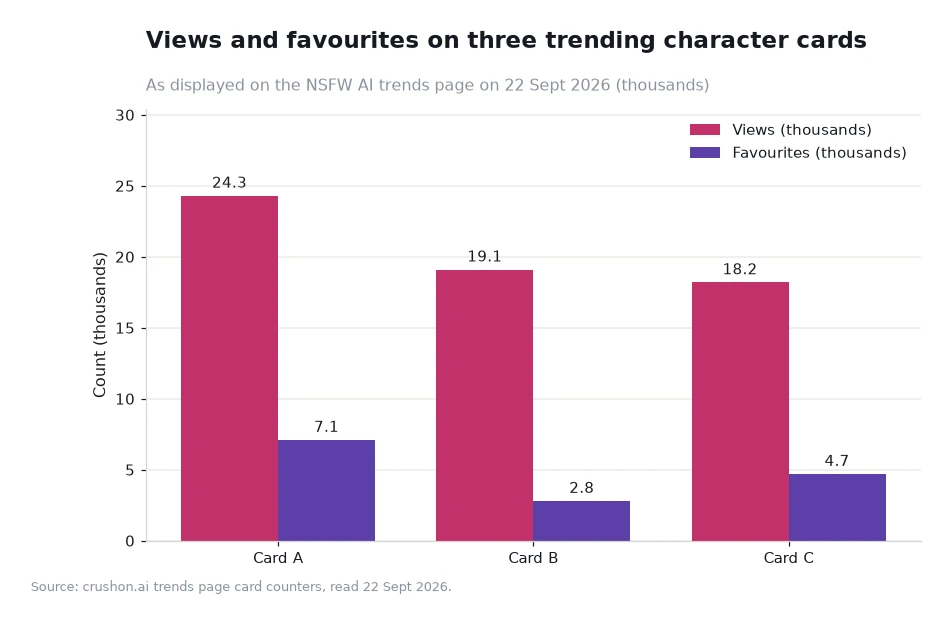
A first session is really five small decisions: where to browse, which card to open, what to type first, how to steer the reply, and what to keep. Budget about twenty minutes to make all five properly. The board you land on runs to twenty entries, and the counters under those cards — 24.3M views against 7.1K favourites on the busiest one, read 22 Sept 2026 — are a reasonable proxy for which characters other adults return to.

Key takeaways
- Five steps cover a first visit: browse, open, talk, adjust, save. Twenty minutes is enough for a full pass.
- Filters do the early work. The front page offers Unfiltered, Filtered and 18+ views plus a gender filter, and shelves such as Recent Hits and Animated.
- A card's counters are a shortcut to a shortlist: 7.1K favourites against 24.3M views works out at about 0.029 percent, while 2.8K against 19.1M sits near 0.015 percent.
- Illustrative arithmetic for a routine: 20 minutes a day across 30 days is 600 minutes, or 10.0 hours a month.
Step one: browse with a filter already set
Start on the front page rather than on a search result, because the front page exposes the structure of the site in one glance. The navigation offers Characters, Memories and Creators, and each is a different way into the same catalogue. Characters is the browsing surface. Creators is where you see who assembled the entries, which matters if you like one style and want more of it.
Set a filter before scrolling. An Unfiltered view shows the widest catalogue, a Filtered view narrows it, and the 18+ view is the age-gated one. If you already know whether you want a male or female character, the gender filter removes most of the list immediately. Two shelves are worth a look on a first visit: Recent Hits, which surfaces what has moved lately, and Animated, which groups entries by presentation rather than by theme.
The last piece of browsing advice is the least obvious. Read the tag line and the creator credit under each card before you click. Tags such as Unfiltered, Submissive, Fictional, OC and Female are the site's own short labels, and they set expectations faster than any preview.
Steps two and three: open a card, then say something specific
Opening a character costs nothing but a click, so open two or three and compare rather than committing to the first. What you are looking for is whether the description matches the mood you had in mind. If it does, start the conversation with a concrete sentence: where you are, who the character is to you, and what you want to happen in the next minute of the scene.
Specific openings do more work than long ones. A two-line scene with a place, a relationship and a task gives the character something to react to, and the reply lands closer to the tone you wanted. The platform describes its own behaviour as adapting to your personality and remembering your preferences, so the opening message is also the calibration step.
| Step | What you do | Time | How you know it worked |
|---|---|---|---|
| Browse | Open the front page, set a filter, scan Recent Hits | About 5 minutes | The visible list matches the kind of character you wanted |
| Open a card | Read the tags and the creator credit, then open two or three entries | About 3 minutes | One description reads like the scene you had in mind |
| Talk | Send one concrete opening with a place, a relationship and a task | About 2 minutes | The first reply continues the scene instead of asking questions |
| Adjust | Correct the tone once, in plain words, without rewriting everything | About 5 minutes | The next two replies hold the tone you asked for |
| Save | Add the character to your own list and note why you kept it | About 2 minutes | You can find it again next week without searching |
Steps four and five: adjust once, then save deliberately
Adjustment is a single correction, not a rewrite. If the reply drifts formal when you wanted casual, say so in one line and continue the scene in the same message. Repeated corrections in a row tend to pull the conversation back to the beginning, which loses the detail you already established.
Saving is where a first session pays off later. Every character you keep goes into a personal list, and the list becomes your own shortlist for future visits. A note of one line per save — the tone you used, the opening that worked — turns a collection of names into something reusable.
Worked example: what a first month looks like
Take an illustrative reader who gives the site 20 minutes a day for 30 days. That is 600 minutes in the month, which is 10.0 hours at 60 minutes per hour. The same habit expressed in sessions: four visits a week over four weeks is 16 sessions, worth 4.0 hours at 15 minutes each, 8.0 hours at 30 minutes each, and 16.0 hours at 60 minutes each. These are worked examples about one person's routine, not measurements of the platform.
Then attach a shortlist to the time. If one in four sessions ends with a character saved, the 20-minute-a-day reader finishes the month with about four new entries in their list. Compare that with the published counters: 4.7K favourites against 18.2M views on one card is roughly 0.026 percent, so a personal list of a few dozen names is already a much tighter filter than the board itself.
What to do in week two
By the second week the browsing problem is solved and the interesting question becomes discovery. Open the character search page to see which tags are trending, and use the weekly rankings, which refresh every Thursday, to find entries that were not on the front page when you started. The homepage itself, at https://crushon.ai/, is the one page worth re-reading after a week, because the shelves rotate and the Recent Hits row will have changed.
Keep the five steps in the same order. Adults who stay with Crushon for months tend to be the ones who browse with a filter, open a specific scene, correct the tone once, and save only what they intend to revisit. The mechanics are simple; the discipline is in not skipping the last step.
Frequently asked questions
How long should a first conversation be?
Fifteen to thirty minutes is a fair trial. That is long enough to see whether the character holds a scene and short enough that you have not invested a whole evening in one choice.
Do I need an account to look around?
Browsing is the lightest part of the site. Saving characters, returning to a memory and keeping a personal list are the parts that need an account and a signed-in session.
What should I do if a character does not suit me?
Close the chat and open another card. There is no penalty for leaving a scene early, and the tags under each entry are there to help you avoid the same mismatch twice.
Plan the second visit before you close the tab
The single habit that makes a second visit easy is a note. Before you close the tab, write one line about what you were looking for and one line about which character came closest. Next time you open the site, that note is your filter, and you skip the fifteen minutes of browsing you spent on the first visit.
Two weeks of notes gives you a small personal guide to a catalogue of twenty rotating entries, which is more useful than any generic list. Keep it short, keep the reasons, and update it when the Thursday rankings rewrite the board.
Data and sources: front-page navigation, filters and shelves, and the card counters on the trends board[1], plus the weekly ranking schedule on the search page[2] and the tutorial archive on the AI chat blog[3]. Counters read 22 Sept 2026; time budgets are worked examples. Intended for adults 18+; read 22 Sept 2026.